
FACTS Family App
FACTS ManagementEducation
3.9417.00 Reviews
- Version
- 60.7.0
- Installs
- 100.00K
- Age Rating
- Everyone
Screenshots

Our Review of FACTS Family App
 Analysis by Appyee
School communication apps are useful only when they reduce the small bits of friction that build up during a busy week. I tested FACTS Family App with that standard in mind: can a parent reach the information connected to school life without jumping between scattered messages, paper notices, and separate services? My overall impression is that it is most valuable as a central access point for families already connected to a school using FACTS Management, rather than as a general education app anyone can use independently.
The app is free to download, aimed at Everyone, and belongs to the Education category. FACTS Management developed it as a family-facing companion for staying connected with school activity. Its store summary describes that purpose simply, and my experience matches it: the app is less about teaching lessons directly and more about keeping school-related communication and family tasks within reach.
That distinction matters. If you are expecting a learning platform packed with courses, practice exercises, or independent study tools, this is probably not the right download. If your school uses the FACTS ecosystem and has asked families to keep up with school information through it, the app makes much more sense. The usefulness depends heavily on that school connection, so I would decide based on your school’s setup before judging it as a standalone education product.
How the app feels during ordinary school routines
I find the app most useful when I treat it as a quick checkpoint in the school day, rather than something to monitor constantly. A brief check before leaving work or heading to pickup can help me spot a detail that changes the family’s plans, while saving more involved questions for a calmer moment. That everyday rhythm also makes it easier to decide which information needs a follow-up outside the app.
Speed expectations when checking school information
My first impression is that FACTS Family App is designed for short, purposeful visits. I would open it to check something related to the school, confirm a detail, or see whether there was an update, rather than leave it open for long periods. That is the right design direction for a family app: the important question is not whether it feels like an entertainment app, but whether it gets me to the relevant information without making the process feel like another chore.
The current version is 60.7.0, and the app supports Android 7.0 and later. Those details make it accessible to many older Android phones, although support for an older operating system should not be mistaken for a guarantee that every device will feel equally quick. A recent phone with plenty of free storage will generally offer a more comfortable experience than an aging handset that is already struggling with several everyday apps.
One useful habit is to open the app before an important school deadline rather than waiting until the last minute. That gives me time to sign in, check that the correct family or student information is visible, and deal with any account issue while there is still time to contact the school. This is a small workflow improvement, but it matters because the app’s value is tied to timely access, not just installation.
I also prefer using it for deliberate checks instead of repeatedly refreshing. A family communication tool should be treated as a place to review meaningful updates, not as a feed that needs constant attention. That approach saves battery and reduces the chance of overlooking an important item among too many casual checks.
What happens during heavier-use moments
The demanding moments are likely to come when several school-related tasks arrive close together: checking a message, reviewing a notice, switching between family information, and returning to the app later to confirm something. Those moments reveal more than a quick launch because they test whether the app remains understandable while I move through several pieces of information.
My advice is to handle one task at a time. I would read the message or notice first, note any action required, and then leave the app rather than opening multiple sections without a clear purpose. This is especially helpful for parents managing more than one child or coordinating school information with another adult. A short written note or calendar reminder outside the app can prevent the common mistake of assuming that simply reading an update means the task is finished.
Another practical trade-off is the difference between convenience and completeness. A mobile app is handy when I am away from a computer, but a larger screen can be better for carefully reviewing detailed school information or comparing several items. I would use the phone for quick checks and immediate follow-up, while reserving a browser or computer for anything that requires extended reading. That is not a failure of this app; it is a sensible division between mobile access and larger-screen work.
Families should also avoid judging the app solely by how busy the school communication becomes. If many updates arrive at once, the experience can feel demanding even when the app itself is functioning properly. The real question is whether the information remains easy to locate and whether the app helps me return to the relevant item without confusion. For that reason, I would keep school-related notifications and reminders organized outside the app when a date or action is important.
Reliability and recovering from interruptions
Reliability is particularly important here because school information is time-sensitive. A shopping app can be postponed; a school message about a schedule change or required action may not be so forgiving. I therefore look for a predictable routine: open the app, confirm that I am in the right account, review the newest information, and close it only after deciding whether anything needs follow-up.
If the app does not behave as expected, I would start with simple recovery steps rather than repeatedly tapping the same control. Check the internet connection, close and reopen the app, and try again after confirming that the phone is not overloaded with other tasks. If the problem is account-specific or connected to school access, the school’s administrative contact is more likely to help than random troubleshooting. This is an important limitation of an institution-linked app: some issues are outside the phone itself.
I also recommend checking access before travel, an appointment, or a day when you expect to be away from home. Relying on any communication app at the exact moment information is needed is risky if the account has expired, the device has changed, or the connection is weak. A quick earlier check lets me identify whether the problem is local to my device or related to the school account.
Recovery is easier when I avoid making unnecessary changes. I would not immediately uninstall the app or clear stored information unless I understood the consequences, because doing so may create another sign-in task. A restart and a fresh connection attempt are less disruptive first steps. If the issue continues, documenting what I was trying to access and when it happened gives the school a clearer starting point.
Device constraints and everyday resource use
Because the app supports Android 7.0 and later, it can suit families who keep an older phone in service. That is a welcome practical point, especially when a parent uses a secondary device or shares responsibility for school communication. Still, an older operating system often comes with other constraints, such as limited storage, slower multitasking, or a battery that no longer holds a full charge. Those factors can shape the experience more than the app’s listed compatibility.
I would keep reasonable free storage available and close unrelated apps if the phone feels sluggish. This is not unique to FACTS Family App, but it is particularly sensible for a utility that I may need at an inconvenient moment. A phone that is nearly full can make every app feel unreliable, and blaming the school app immediately can lead to unnecessary account changes.
Battery use should be considered in context. The app is intended for checking school information, not for continuous media consumption, so my expectation is that normal short visits should be less demanding than using video or gaming apps. I would still avoid leaving it open unnecessarily, especially on an older phone. Using a stable Wi-Fi connection at home for longer reviews can also make the experience more comfortable than trying to manage several school details over a weak mobile signal.
There is another device constraint that is easy to overlook: the phone may be shared by several family members. In that situation, account switching and privacy become part of the practical experience. I would make sure the correct family profile is active before acting on information, and I would avoid handing the phone over with a sensitive school screen left open. The app may be convenient, but convenience does not remove the need for ordinary device awareness.
Who will benefit most from it
FACTS Family App is a strong fit for parents and guardians whose school already uses FACTS Management and expects families to communicate through that environment. It can also help a busy household that wants one familiar mobile route for school-related checks instead of relying on memory, printed notices, or a long email search.
A realistic example is a parent leaving work and needing to check school information before collecting a child. I would open the app, review the relevant update, and decide whether the next step belongs on my calendar, in a message to another caregiver, or in a conversation with the school. The benefit is not that the phone magically manages family life; it is that the information is available at the moment a decision has to be made.
It can also suit families with limited technical confidence because the purpose is narrow and recognizable. Rather than learning a complicated productivity system, the user can approach it as the school’s mobile communication point. That said, the school still needs to provide clear guidance. A parent cannot solve confusion about which channel the school uses simply by installing another app.
I would skip it if the school does not use the FACTS system or has not directed families to it. Installing it without that connection is unlikely to provide much value. I would also look for a different solution if my main need were homework practice, classroom collaboration, video lessons, or a complete academic dashboard. Those jobs belong to learning platforms, school portals, or communication tools built specifically around them.
How it compares with ordinary alternatives
The usual alternatives are email, a school website, paper notices, messaging groups, and a general calendar. Each has a different strength. Email is searchable and familiar, but important messages can disappear into a crowded inbox. A website may contain broad information, but it can require more navigation. Paper is easy to hand to a child, yet it is also easy to lose. A calendar is excellent for remembering dates, but it cannot replace the original school communication.
The advantage of FACTS Family App is the possibility of a more direct school-specific routine. Instead of treating every update as a separate source, I can use the app as the first place to check information connected with the school. The limitation is equally clear: its usefulness depends on the school’s adoption and on how consistently information is maintained there. A general messaging app may be faster for an urgent conversation, while email may remain better for keeping a detailed written record.
My preferred approach is not to force every task into the app. I would use it as the school information checkpoint, move dates into my family calendar, and use the school’s preferred direct contact method when a response is needed. That division avoids expecting one mobile tool to serve as notification center, archive, calendar, and conversation space all at once.
Cost, access, and the practical trade-offs
The app is free, which removes the biggest barrier for families who need school access. It also carries an Everyone content rating, so its intended audience is broad rather than limited to adults. In-app purchases are listed at $4.99 per item, so I would still pay attention to any purchase prompt and make sure family members understand which actions are necessary for school access and which are optional.
The free entry point is helpful, but cost is not the only consideration. Time, attention, account setup, and reliable access all matter. A free app that a family cannot use confidently is not truly convenient. I would spend a few minutes establishing a routine: decide who checks school updates, where action items are recorded, and which issues should be taken directly to the school office.
The app has reached over 100,000 installs, while its average rating is 3.9 from around 900 ratings and more than 400 written reviews. I read that as a sign of a useful but not universally effortless tool. A rating in that range suggests that the experience may vary with school configuration, account setup, device condition, and individual expectations. I would treat it as evidence of real adoption, not as a promise that every family will find it seamless.
My performance verdict after using it
FACTS Family App succeeds when I use it for what it is: a focused mobile connection between a participating school and the family. Its strongest quality is practical access. I can check school-related information in the moment instead of waiting until I reach a computer, searching through old messages, or hoping a paper notice is still in a backpack.
Its weaker side is dependence. The app cannot compensate for unclear school communication, an account problem, a poor connection, or a phone that is already running out of space. It is also not a replacement for a full learning platform, a family calendar, or a direct conversation with school staff. Those boundaries are important because they prevent disappointment and help me use the app efficiently.
For a family already connected to FACTS Management, I would recommend installing it and creating a simple checking routine. Test access before you urgently need information, confirm the active family details, and transfer important dates or tasks into the tool you already use to organize your household. For everyone else, I would first confirm that the school actually relies on this app; without that connection, another education or communication option will be more useful.
In the end, I see it as a sensible utility rather than an app I would open for entertainment or independent learning. Its performance value comes from short, intentional visits and a clear recovery plan when something interrupts access. If your school uses the FACTS ecosystem, the most useful way to approach it is as a dependable school-information checkpoint, not as an all-purpose family organizer. That expectation makes its strengths easier to appreciate and its limitations much easier to manage.
Verdict
Strengths of FACTS Family App
- Simple interface makes it easy for children and parents to navigate.
- Supports family communication and shared activities in one place.
- Useful reminders can help organize routines and important family events.
- Privacy-focused features may provide parents with greater peace of mind.
- Suitable for families looking for a dedicated, non-social communication space.
Limitations of FACTS Family App
- Some features may require a subscription or in-app purchases.
- The app’s usefulness depends on every family member installing and using it.
- Limited appeal for families that already rely on messaging apps and calendars.
- Notifications may become excessive if too many reminders are enabled.
- Compatibility and feature availability can vary between Android and iOS devices.
Similar Picks in This Category
View All
Duolingo: Language Lessons
Duolingo4.7

Google Classroom
Google LLC2.8

Unacademy: Learn & Crack Exams
Unacademy3.2

Bible App for Kids
Life.Church4.4

Cake - Learn English & Korean
Cake Corp.4.7

Brainly: AI Homework Helper
Brainly4.5
Frequently Asked Questions
What is the FACTS Family App used for?
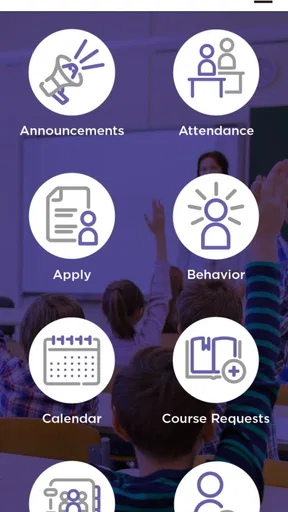
The FACTS Family App is designed to help parents and guardians stay connected with their child’s school community in one place. Depending on the school’s setup, it may provide access to announcements, calendars, messages, grades, attendance information, assignments, forms, and other family resources. Available features can vary, so your school must use FACTS and provide access before the app becomes useful.
How do I log in to the FACTS Family App?
To use the app, families generally need an account connected to their school’s FACTS system. You may be asked to sign in with credentials provided by the school or created through the FACTS Family Portal. If you cannot remember your password, use the recovery option or contact your school office. Make sure you select the correct school account if you have children enrolled at different institutions.
Is the FACTS Family App free to download and use?
The FACTS Family App is typically available to download without a separate app purchase, but access and certain services depend on your school’s FACTS subscription and policies. Some schools may charge tuition, activity, payment, or other administrative fees through the platform, although those charges are not necessarily app fees. Check with your school for details about costs and supported features.
What information can parents see in the FACTS Family App?
The information displayed depends on the permissions and modules enabled by your school. In a typical setup, parents may be able to view school notices, calendars, student schedules, attendance, grades, assignments, forms, billing details, or messages from staff. Not every school activates every feature, and some information may be delayed until teachers or administrators publish updates.
Is the FACTS Family App safe for managing family and school information?
The app is intended for communication between schools and authorized families, so it may handle personal, academic, and payment-related information. Use a strong, private password and avoid sharing your login with others. Keep the app updated, enable device security such as a passcode or biometric lock, and log out on shared devices. For privacy questions or suspicious activity, contact your school or FACTS support.
